Mobile account management for Humanet home service customers
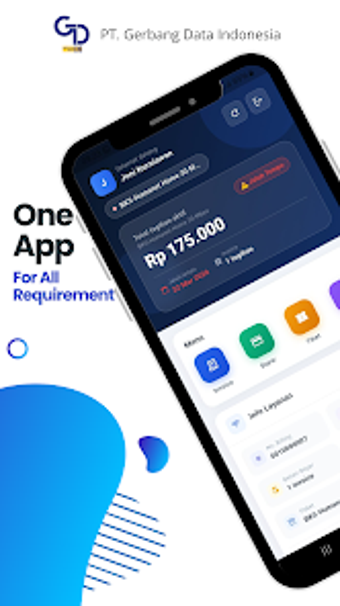
Humanet Home by GDI-Developer is a customer service app designed for residential subscribers to manage their Humanet home services on Android devices. The app acts as a mobile portal for account control, enabling users to review subscriptions, perform billing-related actions, and contact support from a single interface. Key functions include viewing billing and service status while receiving maintenance and billing notifications. It suits household users who prefer mobile-first account management instead of phone-based support.
How the app keeps account data current for users
Humanet Home connects directly with the provider backend to keep account data aligned with the service system, a design decision that supports real-time accuracy for billing and status displays. That direct synchronization is explicit in the app description and explains why displayed balances and connectivity checks reflect the provider's records rather than cached device data.
How access, onboarding, and device compatibility behave
Account access uses registered credentials
Who benefits day-to-day and how support interaction changes
Residential subscribers gain faster reporting paths because the app offers a simplified reporting channel that bypasses traditional call-center queues, according to the product notes. User reception highlights convenience for mobile bill handling and remote status checks. The developer association with a digital service ecosystem suggests the app targets customers already enrolled in the provider's infrastructure.
Practical choice for mobile-first residential account management
Humanet Home is a pragmatic option for Humanet residential customers who need a mobile portal to manage service accounts and receive operational notices. Dependence on the provider's backend means the app's usefulness tracks the provider's data quality and update cadence. For households comfortable managing accounts on Android, the app presents a direct, app-based alternative to phone support and in-person requests.
Pros
Backend synchronization provides up-to-date account and billing accuracy
Simplified reporting reduces reliance on traditional call-center wait times
Android compatibility and credential logins fit typical mobile household setups
Cons
Limited to Android devices, excluding non-Android users
Requires registered customer credentials to access account features
Functionality depends on provider backend accuracy and update cadence
Laws concerning the use of this software vary from country to country. We do not encourage or condone the use of this program if it is in violation of these laws. Softonic may receive a referral fee if you click or buy any of the products featured here.